
Microsoft Intune: Smarter Device Management for SMBs

As hybrid work becomes the norm rather than the exception, IT managers and CIOs are under increasing pressure to secure a growing sprawl of laptops, tablets, and smartphones without slowing down their teams. This is where Intune comes in. Microsoft Intune is a cloud-based unified endpoint management (UEM) platform that gives organizations centralized control over the devices and applications their employees use every day. At Forte Systems, we help businesses evaluate, deploy, and optimize Intune as part of a broader IT security and management strategy.

What Is Microsoft Intune?

Microsoft Intune is part of the Microsoft Endpoint Manager suite and integrates closely with Microsoft Entra ID (formerly Azure Active Directory) to provide identity-driven security alongside device management. It allows IT teams to enroll, configure, monitor, and protect devices no matter if they are corporate-owned or part of a bring-your-own-device (BYOD) program—from a single cloud console. According to Microsoft’s official documentation, Intune supports Windows, macOS, iOS/iPadOS, and Android, making it a genuinely cross-platform solution for organizations with diverse devices.

For businesses that have historically relied on manual configuration, spreadsheets, or fragmented tools to track hardware and software compliance, Intune represents a significant step toward automation and consistency. This is particularly valuable for IT managers who are accountable for both security posture and end-user productivity, often with limited internal resources.

Why Intune Matters for Modern IT Strategy

Cybersecurity threats increasingly target endpoints—the laptops, phones, and tablets that connect to corporate networks and cloud services. The Cybersecurity and Infrastructure Security Agency (CISA) has repeatedly emphasized the importance of strong endpoint and identity controls as foundational elements of a resilient security posture. Intune directly addresses this need by allowing organizations to:

  • Enforce compliance policies, such as requiring device encryption or up-to-date operating systems, before granting access to corporate resources.
  • Remotely wipe or lock lost or stolen devices to protect sensitive data.
  • Push software updates and security patches consistently across the organization.
  • Manage BYOD scenarios by separating personal and corporate data through app protection policies.
  • Integrate with conditional access rules in Microsoft Entra ID to block risky sign-ins or non-compliant devices.

For CIOs and business leaders evaluating IT support options, this level of control is not just a convenience, it is increasingly a compliance and risk management necessity, particularly in regulated industries such as healthcare, finance, and legal services.

Key Features IT Managers Should Understand

Device Enrollment and Configuration

Intune supports automated enrollment methods, including Windows Autopilot and Apple Business Manager integration, which allow new devices to be configured and secured straight out of the box, with minimal manual setup required by IT staff.

Application Management

Beyond device-level controls, Intune allows administrators to manage applications independently of device ownership. This means a company can protect corporate data within an app—such as Outlook or Teams, even on a personal phone, without controlling the entire device.

Compliance and Conditional Access

Intune policies work hand-in-hand with conditional access to ensure that only devices meeting specific security requirements—such as antivirus status or OS version—can access company email, files, or applications.

Reporting and Monitoring

Centralized dashboards give IT teams visibility into device health, compliance status, and pending updates, reducing the guesswork involved in maintaining a secure fleet across multiple locations or remote employees.

Common Challenges When Adopting Intune

While Intune is a powerful platform, many organizations struggle with the initial planning and configuration phase. Common pitfalls include overly complex policy structures, inconsistent naming conventions, and insufficient testing before wide-scale rollout. Without a clear strategy, IT teams can end up with a management tool that adds administrative overhead rather than reducing it.

Licensing can also be a point of confusion, as Intune is available standalone or bundled within various Microsoft 365 and Enterprise Mobility + Security plans. Understanding which license tier aligns with your organization’s security and compliance requirements is an important early step, and one where experienced guidance can save both time and budget.

How LMJ Forte Approaches Intune Deployments

At LMJ Forte, we work with IT managers, CIOs, and business leaders to design Intune deployments that reflect the realities of their organization, not just a generic template. This typically includes:

  • Assessing current device inventory, operating systems, and existing management tools.
  • Designing compliance and configuration policies aligned to your industry’s security expectations.
  • Planning a phased rollout to minimize disruption to end users.
  • Providing documentation and knowledge transfer so internal IT staff can confidently manage the platform going forward.

Our goal is not simply to turn on a product, but to ensure that Intune becomes a sustainable part of your broader IT and security strategy—one that scales as your organization grows and as device management standards continue to evolve, as tracked by organizations like the National Institute of Standards and Technology (NIST) in their guidance on mobile device and endpoint security.

Is Intune Right for Your Organization?

Microsoft Intune is particularly well-suited for organizations already invested in the Microsoft 365 ecosystem, those managing a mix of company-owned and personal devices, and businesses that need to demonstrate compliance to auditors, clients, or regulators. That said, no platform is a perfect fit for every environment without proper planning. If you are currently a Google Suite company, but grown beyond 50 users, it might make sense to review the options with Microsoft 365.

If your organization is considering Intune, or if you have already deployed it but are not confident it’s configured optimally, a structured assessment can clarify what’s working, what’s missing, and what risks may still exist. We can help IT leaders make that determination with a clear, technically grounded evaluation.

Ultimately, effective endpoint management is not just about the technology itself, but about how well it is implemented, monitored, and maintained. With the right approach, Intune can become a cornerstone of a more secure, more manageable IT environment for your entire organization.

Microsoft 365: A Bay Area IT Manager’s Guide

For IT Managers and CIOs across the San Francisco Bay Area, choosing the right productivity and collaboration platform is no longer a dollars and cents decision—it’s a strategic one. Microsoft 365 has become the default choice for organizations that need secure email, real-time collaboration, and cloud storage in a single subscription. At Forte Systems, we work with Bay Area businesses every day to deploy, secure, and optimize Microsoft 365 environments, and we’ve seen firsthand what separates a smooth rollout from a costly headache. Now I know. This is Silicon Valley, the Bay Area – forget Microsoft, we grew up on Google Suite. Grammar school, Middle School, High School and College. Heck, my VC recommends it! Ok, I hear you -but really, can’t we just give Clippy a chance?

This guide breaks down what Microsoft 365 actually offers, why it matters for business leaders managing distributed and hybrid teams, and the key considerations your organization should weigh before expanding or migrating your deployment.

What Is Microsoft 365, Exactly?

Microsoft 365 is a subscription-based suite that bundles the familiar Office applications—Word, Excel, PowerPoint, and Outlook—with cloud services like Exchange Online, SharePoint, OneDrive, and Microsoft Teams. Unlike the older perpetual-license version of Microsoft Office, Microsoft 365 is continuously updated and tightly integrated with Microsoft’s cloud identity and security platform, Azure Active Directory (now Microsoft Entra ID). You can review Microsoft’s own documentation or the Wikipedia overview of Microsoft 365 for a breakdown of its evolution from Office 365 to its current branding.

For IT leaders, the distinction matters: Microsoft 365 isn’t just software, it’s a managed ecosystem that touches identity management, endpoint security, compliance, and data governance all at once.

Why Bay Area Organizations Are Standardizing on Microsoft 365

The Bay Area’s dense concentration of tech-forward companies, startups, and professional services firms has pushed adoption of cloud productivity tools faster than in many other regions. A few reasons Microsoft 365 continues to win out among our clients:

  • Hybrid work support: Teams, SharePoint, and OneDrive make it straightforward for distributed teams across San Francisco, the Peninsula, and the East Bay to collaborate without VPN bottlenecks.
  • Built-in security tooling: Features like conditional access, multi-factor authentication, and Microsoft Defender give IT teams a foundation for a modern security posture without buying separate point solutions.
  • Scalability: Licensing tiers allow organizations to grow from a handful of employees to enterprise scale without switching platforms.
  • Compliance alignment: Microsoft maintains compliance mappings to frameworks referenced by agencies like the National Institute of Standards and Technology (NIST), which is helpful for regulated industries such as finance and healthcare that are common throughout the region.

Common Pitfalls We See in Microsoft 365 Deployments

Despite its strengths, Microsoft 365 is often under-configured or over-licensed. As an IT consulting partner, Forte Systems frequently encounters the same recurring issues when we audit a new client’s environment:

1. Security Defaults Left Unconfigured

Microsoft 365 ships with security features that are not always enabled by default. Multi-factor authentication, conditional access policies, and data loss prevention rules need to be deliberately configured to match your organization’s risk profile. Leaving default settings in place is one of the most common gaps we find during security assessments.

2. Licensing Sprawl

Many organizations pay for premium tiers—like Microsoft 365 E5—without using the advanced compliance or analytics features included. A licensing review can often uncover meaningful savings or, alternatively, reveal that a lower tier is leaving your team without protections it should have.

3. Poor Data Governance

SharePoint and Teams make file sharing effortless, which is a double-edged sword. Without clear governance policies, sensitive data can end up shared more broadly than intended. IT leaders should establish retention policies and sharing permissions early, rather than retrofitting them after an incident.

4. Underused Collaboration Tools

Many companies pay for the full Microsoft 365 suite but only use Outlook and Word, leaving tools like Power Automate, Planner, and Teams’ deeper integrations untapped. This represents lost productivity value that’s already been paid for.

Security Considerations for IT Leaders

Given the sophistication of today’s threat landscape, Microsoft 365 environments are a frequent target for phishing and credential-based attacks. The Cybersecurity and Infrastructure Security Agency (CISA) has published guidance specifically addressing cloud email security, much of which applies directly to Microsoft 365 tenants. Key recommendations we help clients implement include:

  • Enforcing multi-factor authentication across all accounts, including service accounts
  • Applying conditional access policies based on device compliance and location
  • Enabling audit logging and regularly reviewing sign-in activity
  • Training employees to recognize phishing attempts, since human error remains a leading cause of breaches

For CIOs weighing risk, it’s worth noting that a well-configured Microsoft 365 tenant, paired with sound governance, can meaningfully reduce your organization’s attack surface compared to a patchwork of disconnected tools.

Getting the Most Out of Microsoft 365

Deploying Microsoft 365 is not a “set it and forget it” project. It benefits from ongoing management, similar to any critical business infrastructure. Organizations that get the most value typically:

  • Conduct periodic license and usage audits
  • Review security configurations quarterly, not just at initial setup
  • Provide ongoing user training as features evolve
  • Partner with an experienced IT consulting firm to manage updates, troubleshoot issues, and align the platform with business goals

How Forte Systems Supports Microsoft 365 Environments

As a Bay Area IT consulting firm, Forte Systems helps organizations plan, migrate, secure, and manage their Microsoft 365 environments. Whether you’re consolidating legacy systems, tightening security policies, or simply trying to understand whether you’re getting full value from your current licensing, our team brings the technical depth that IT Managers and CIOs need to make confident decisions.

If your organization is evaluating a new Microsoft 365 deployment or wants a second opinion on your current setup, Forte Systems is ready to help you build a more secure, efficient, and cost-effective cloud environment.

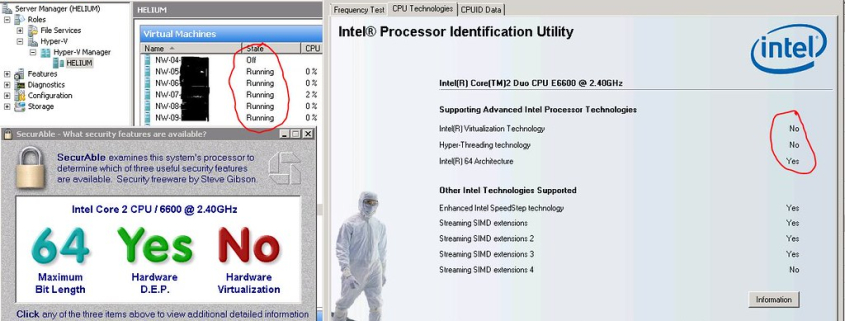
Hyper-V Intel VT

Hyper-V Explained: A Guide for IT Leaders

Virtualization sits at the core of nearly every modern IT strategy, and Hyper-V remains one of the most widely deployed platforms for organizations running on Microsoft infrastructure. For IT Managers, CIOs, and business leaders evaluating where to invest their infrastructure budget, understanding what Hyper-V is, how it works, and where it fits into a broader IT strategy is essential to making an informed decision. At Forte Systems, we work with organizations every day to design, deploy, and manage virtualization environments that are secure, scalable, and cost-effective, and Hyper-V is frequently at the center of those conversations.

What Is Hyper-V?

Hyper-V is Microsoft’s native hypervisor, a type-1 (bare-metal) virtualization technology that allows a single physical server to run multiple virtual machines (VMs), each with its own operating system and applications. Built into Windows Server and available as a standalone product, Hyper-V enables organizations to consolidate workloads, reduce hardware footprint, and improve disaster recovery capabilities. According to Wikipedia’s overview of Hyper-V, the platform was first released with Windows Server 2008 and has since become a core component of Microsoft’s server and cloud ecosystem, including deep integration with Azure.

Because it operates at the hardware layer rather than on top of a host operating system, Hyper-V offers strong performance and isolation between virtual machines. This architecture is part of the broader category of hypervisor technology, a concept well documented in resources such as the Wikipedia entry on hypervisors, which explains how bare-metal and hosted hypervisors differ in design and use case.

Why IT Leaders Are Paying Attention to Hyper-V

For decision-makers balancing budget constraints against the need for resilient, flexible infrastructure, Hyper-V presents several strategic advantages worth evaluating:

  • Cost efficiency: Hyper-V is included with many Windows Server licenses, which can reduce the total cost of ownership compared to third-party virtualization platforms that require separate licensing.
  • Native Microsoft integration: Organizations already invested in the Microsoft ecosystem, including Active Directory, System Center, and Azure, often find that Hyper-V integrates more seamlessly with existing tools and workflows.
  • Scalability: Hyper-V supports features like live migration, dynamic memory allocation, and clustering, allowing infrastructure to scale as business needs grow.
  • Disaster recovery and business continuity: Virtualized environments make it easier to replicate workloads, take snapshots, and recover quickly from hardware failures or cyber incidents.
  • Hybrid cloud readiness: Hyper-V’s compatibility with Azure makes it a practical stepping stone for organizations pursuing a hybrid or cloud-first strategy.

These benefits are precisely why Hyper-V continues to be a common recommendation in our infrastructure assessments at Forte Systems, particularly for mid-sized organizations that need enterprise-grade capabilities without the overhead of unnecessary complexity.

Hyper-V vs. Other Virtualization Platforms

IT leaders frequently ask how Hyper-V compares to alternatives like VMware vSphere. Both are mature, well-supported platforms, and the right choice depends on your existing environment, in-house expertise, and long-term technology roadmap. VMware has historically been recognized for advanced enterprise features and a large ecosystem of third-party tools, while Hyper-V has closed much of that gap in recent years and offers a compelling advantage for organizations standardized on Microsoft technology. The National Institute of Standards and Technology (NIST) publishes guidance on virtualization security considerations that applies broadly across platforms, and it’s a useful reference point when comparing the security posture of any hypervisor you’re considering.

Rather than treating this as a one-size-fits-all decision, our approach at Forte Systems is to evaluate your current workloads, compliance requirements, and growth plans before recommending a platform. In many cases, a well-configured Hyper-V environment can meet or exceed the performance and reliability of alternative solutions, particularly when paired with sound architecture and ongoing management.

Common Use Cases for Hyper-V

Organizations across industries deploy Hyper-V for a range of purposes, including:

  • Server consolidation to reduce physical hardware costs and data center footprint
  • Test and development environments that need to be spun up or torn down quickly
  • Running legacy applications on modern hardware without a full rewrite
  • Supporting business continuity and disaster recovery plans through VM replication
  • Enabling hybrid cloud architectures that bridge on-premises infrastructure with Azure

Each of these use cases carries its own configuration and security considerations, which is why a thoughtful deployment strategy matters as much as the technology itself.

Security and Management Considerations

Like any virtualization platform, Hyper-V requires careful configuration to avoid introducing risk. Misconfigured network isolation between VMs, outdated host patching, and weak access controls are common vulnerabilities in virtualized environments generally, not unique to Hyper-V, but still critical to address. The Cybersecurity and Infrastructure Security Agency (CISA) provides general guidance on securing IT infrastructure that’s relevant to any organization running virtualized workloads, including patch management practices and network segmentation principles that apply directly to Hyper-V hosts.

Beyond initial setup, ongoing management, monitoring, patching, and capacity planning are what determine whether a Hyper-V environment remains secure and performant over time. This is often where internal IT teams, already stretched thin with day-to-day support demands, benefit from a trusted partner who can handle the deeper technical lifecycle of the environment.

How Forte Systems Can Help

Deciding whether Hyper-V is the right fit for your organization, and then deploying it correctly, requires more than a checklist. It requires a partner who understands your business objectives, compliance obligations, and existing technology investments. Forte Systems works with IT Managers, CIOs, and business leaders to assess current infrastructure, design a virtualization strategy aligned with Hyper-V or other platforms as appropriate, and manage that environment on an ongoing basis so your team can focus on higher-value initiatives.

Whether you’re consolidating aging servers, building out disaster recovery capabilities, or planning a hybrid cloud migration, our team brings the technical depth to design a Hyper-V environment that supports your business rather than complicating it. If your organization is weighing its virtualization options, we’d welcome the opportunity to discuss how Hyper-V, or the right alternative, fits into your broader IT roadmap.

network security experts

Mandatory Security Baselines: What MSPs Must Require of Their Clients

Mandatory Security Baselines: What MSPs Must Require of Their Clients

For years, managed service providers (MSPs) could treat security as a menu items:

  • Firewalls here,
  • Backups there,
  • Multi-factor authentication (MFA) if the client was willing to pay for it.

Why isn’t this still a good plan?

Regulators, cyber insurers, and federal guidance are converging on a simple expectation: MSPs are responsible for setting a mandatory security floor beneath every client relationship, not an optional upsell.

I want to tell you why “optional” security no longer works for our clients.

MSPs sit at the center of the supply chain, with privileged access into dozens or hundreds of client networks. That concentration of access is exactly why threat actors target providers directly, a risk the Cybersecurity and Infrastructure Security Agency (CISA) formally warned about in its joint advisory on protecting MSPs and their customers (CISA AA22-131A).

A single compromised MSP credential can cascade into ransomware across every client tenant it touches, which is why regulators increasingly hold the provider, not just the client, accountable for baseline hygiene.

That accountability is showing up in contract language and audit requirements.

HIPAA’s proposed 2026 Security Rule updates would require business associates — including MSPs — to prove MFA, encryption, and semiannual vulnerability scanning are actually operating, not merely documented. PCI DSS 4.0.1, mandatory since March 2025, now demands quarterly scans and continuous change-detection evidence. CMMC 2.0 is extending third-party assessment requirements to defense-sector clients starting in November 2026. Add in the FTC Safeguards Rule and a growing patchwork of state privacy laws, and the message is consistent: policies alone no longer satisfy anyone.

What belongs in the baseline

Across these frameworks, a common floor of controls has emerged as the practical minimum an MSP should mandate, not recommend, for every client, regardless of contract tier:

  • Phishing-resistant MFA on all administrative and remote-access accounts, moving beyond SMS or push-based approval.
  • Endpoint detection and response (EDR) with 24/7 monitoring, rather than legacy signature-based antivirus alone.
  • Centralized logging and SIEM coverage sufficient to reconstruct an incident timeline.
  • Documented, tested backups with offline or immutable copies and a defined recovery time objective.
  • Privileged access management, including just-in-time elevation instead of standing admin rights.
  • A patch management cadence with defined SLAs for critical vulnerabilities.
  • A written, exercised incident response plan — not a template that has never been tested.

CISA’s Cross-Sector Cybersecurity Performance Goals restate much of this same list as a voluntary baseline for critical infrastructure organizations, and it’s increasingly the yardstick auditors and cyber insurers reach for even outside regulated sectors.

Making the baseline actually mandatory

The hardest part isn’t defining the baseline — it’s enforcing it. Two mechanisms are becoming standard practice among mature MSPs. First, contracts should state plainly that these controls are conditions of service, not add-ons, with any client refusal captured in a signed risk-acceptance waiver that shifts liability back to the client. Second, evidence should be continuous rather than annual: MFA coverage reports, scan results, and backup test logs generated on a recurring schedule, not produced only when an auditor asks.

That shift — from attestation to continuous, evidence-backed operation — is the throughline across every framework touching MSPs right now. Providers that build it into their service delivery model, rather than bolting it on before an audit, will be the ones still standing when the next regulatory deadline or the next ransomware advisory lands.

Sources
Protecting Against Cyber Threats to Managed Service Providers and their Customers — CISA AA22-131A
MSP Compliance: The Complete Guide to Meeting Security and Regulatory Standards in 2026 — Huntress